Architecture
Platform train v3.9.0 is an in-train upgrade on the same Controller database. Bump image tags, roll Edgelet v1.1.0 on nodes, and upgrade potctl to v3.9.0. See Upgrading to v3.9.0. Greenfield moves from v3.7.x or older still start at Migrating to v3.8.0.
The Datasance PoT architecture has several building blocks. Together they form a logical cluster called an Edge Compute Network (ECN).
Core principles
Datasance PoT gives you one control point to deploy, operate, and govern container workloads across large edge environments. It brings cloud-native operating principles to the edge. You focus on applications instead of infrastructure, security, and networking.
The platform is designed around three principles:
- Distributed, to preserve local autonomy and resilience
- Disaggregated, to stay independent of hardware, operating systems, and environments
- Control-centric, with unified operations and security as first-class concerns
These principles let Datasance PoT manage isolated edge sites as one coherent system without forcing central dependency.
Control plane and Edgelet nodes
The Control Plane coordinates distributed edge environments from a central point. It is backend-agnostic. It runs on Kubernetes clusters, bare-metal hosts, or virtual machines.
An Edgelet node is the worker of an ECN. The same Edgelet binary is the node agent, the application runtime, and the container engine. You can also run that binary on a Linux host by itself, with the edgelet CLI, before any control plane exists. Joining a cluster later uses potctl and kind: Agent.
Edgelet is built for small, mixed edge hardware.
- On Linux the OTA download is the thin binary, less than 35 MB. It is the CLI and the update artifact. The container engine is packed inside that file.
- Linux builds ship for amd64, arm64, arm (32-bit, including armv7), and riscv64. The YAML key for 32-bit ARM is
arm. - The default container engine is embedded. A host does not need Docker or Podman to run containerized workloads or AI applications. macOS and Windows use Docker or Podman.
- The engine stores registries, container images, Model weights, and Knowledge bundles. Built-in rows cover Docker Hub, a local image cache, and Hugging Face. Private OCI and Hugging Face rows are the same kind of object.
- Wasm workloads use a built-in RuntimeClass catalog, including the
edgelet-wasmtimeshim. A cluster install stages those shim binaries whenpackage.wasmis set on the Agent. Wasm is a container on this engine, not a second runtime you install by hand.
Day-2 operations use the Controller, EdgeOps Console, or potctl. You deploy and maintain microservices without SSH on every edge device.
Secure, scalable, hardware-agnostic
Security and control are built in from the start. The platform scales from a few sites to large, geographically distributed clusters. Its hardware-agnostic design lets you choose and evolve edge hardware while keeping consistent operational control across the environment.
Supported node architectures include amd64, arm64, riscv64, and arm (32-bit).
Controller
The Controller (v3.9.0) is the heart of each ECN. It orchestrates Edgelet nodes, microservices, Router and NATS instances, RBAC, secrets, certificates, fleet Model and Knowledge catalogs, and more.
The Controller can run on bare-metal, virtual hardware, or Kubernetes. Every Edgelet node must reach it over the network. That usually means a static IP address or DNS records.
You can also place the Controller behind an HTTP ingress. The Controller is fully functional through its REST and WebSocket APIs.
The Controller image embeds EdgeOps Console (v1.1.0) on port 8008. Default installs use embedded OIDC for authentication.
On v3.9.0, the Controller catalog pulls AI weights and knowledge artifacts from type: oci and type: hf registries, tracks attach state per Edgelet node, and prepares mounts for microservices that bind spec.models and spec.knowledge. See AI Model Catalog and AI Knowledge Catalog.
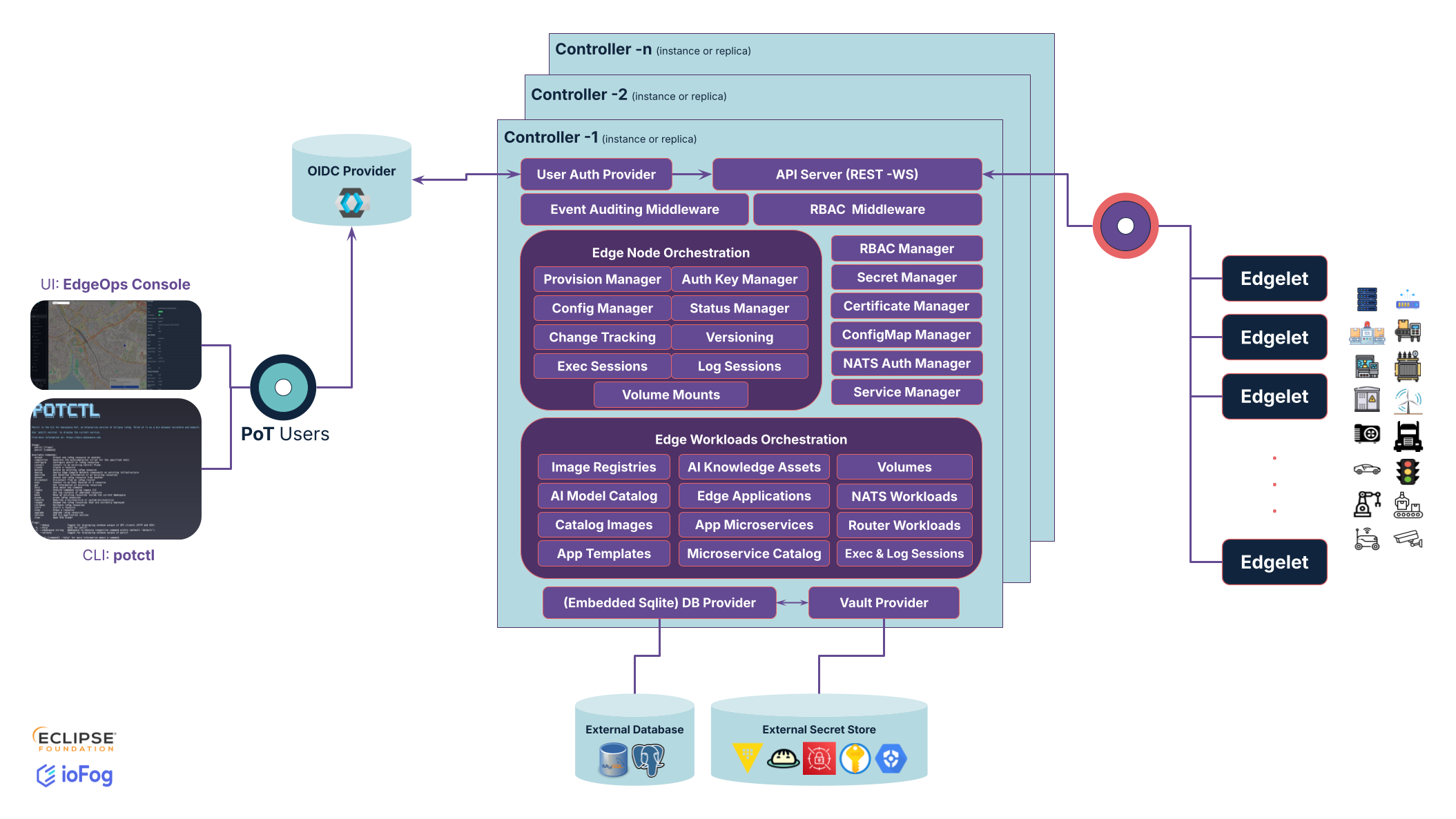
For configuration and the operator notes, see Controller configuration. HTTP routes are the Controller API.
To deploy a Control Plane with potctl, see Platform deployment.
Source code: Controller.
EdgeOps Console
EdgeOps Console is the web UI for Datasance PoT. It is embedded in the Controller image. You manage Edgelet nodes, applications, microservices, routes, AI catalogs, and supporting resources from the browser.
The Console talks to the same Controller REST and WebSocket endpoints as potctl. Authentication follows the same RBAC model. Default installs use embedded OIDC.
Open the Console with potctl view or the URL you set with CONSOLE_URL.
See the EdgeOps Console introduction and features pages.
Source code: edgeops-console.
Edgelet nodes
An Edgelet node is the worker of an ECN. Each node runs the Edgelet runtime and hosts microservices, volumes, and local resources. Every Edgelet node reports to the Controller. The Controller must be reachable from edge nodes, but edge nodes do not need to be reachable from the Controller.
Edgelet manages microservices as containers. It handles their lifecycle and local container images. Edgelet supports multiple CPU architectures and container engines.
Day-2 operations use the Controller, EdgeOps Console, or potctl. You deploy and maintain microservices without SSH on every edge device.
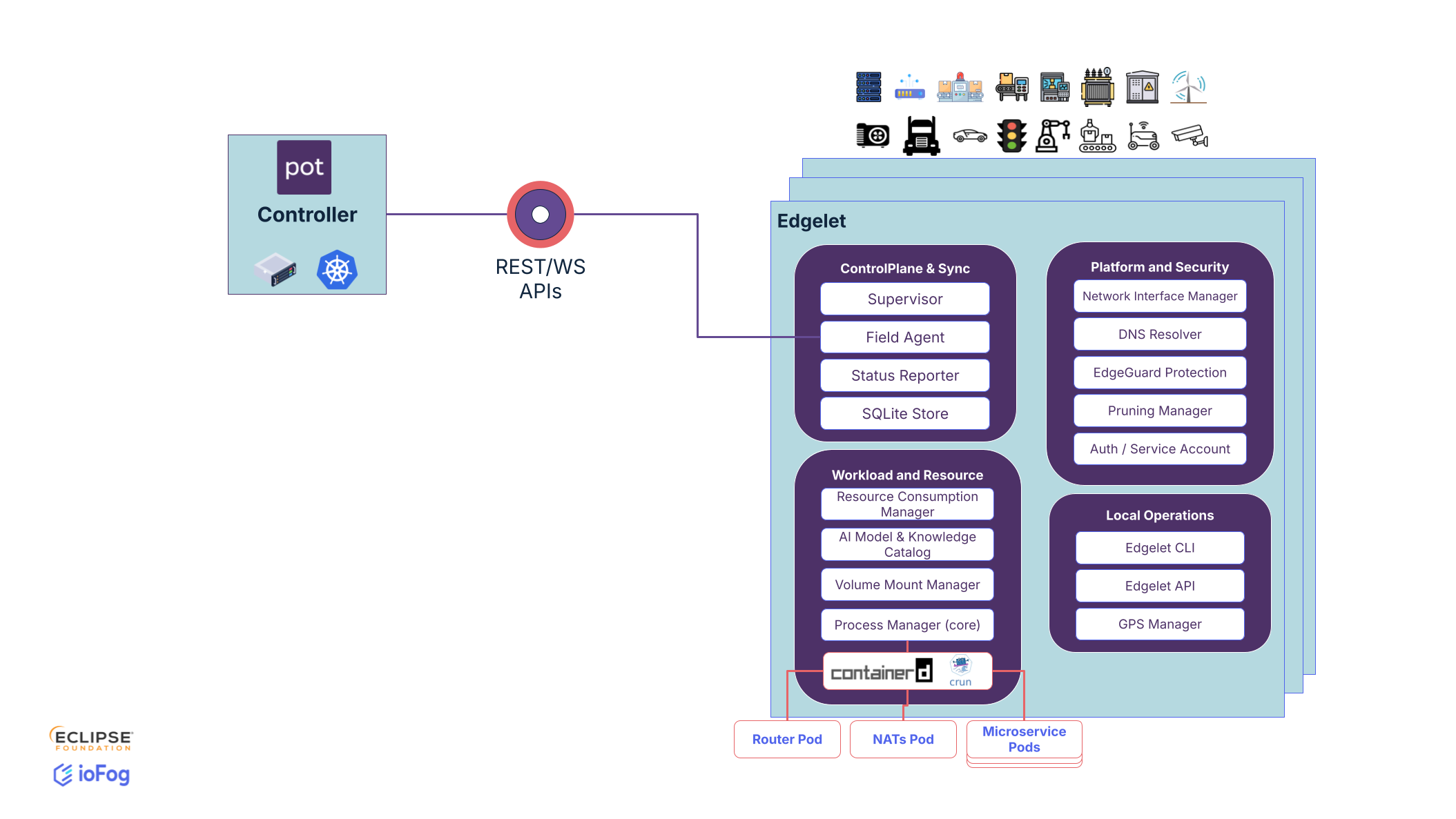
For installation, configuration, EdgeletAPI, and CLI reference, see Edgelet documentation.
To provision Edgelet nodes with potctl, see Setup Edgelet nodes.
For YAML fields, see Edgelet nodes in Learn.
Source code: edgelet.
Microservices
Microservices are the workloads that run on Edgelet nodes. Each microservice is a Linux or Wasm container. Many microservices can run on one Edgelet node. This is similar to Kubernetes pods, except Datasance PoT gives you granular control over which nodes run which microservices.
On v3.9.0, microservices can bind fleet Model and Knowledge catalog entries through spec.models and spec.knowledge, and use expanded container fields for production hardening. See Microservices in Learn.
For application and microservice management, see Applications introduction.
For a hands-on walkthrough, see the Acme Smart Plant tutorial or Edge AI wafer defect.
Router
The Router enables microservices to communicate through TCP bridges created via Service YAML kinds. The platform ships a Router wrapper image (v3.9.0) that embeds Skupper Router 3.5.1. Router is deployed with TLS by default. The Controller tracks Router configuration and TLS certificate volume mounts.
Each Controller and each Edgelet node has its own Router instance by default. The Controller hosts an interior Router. Each Edgelet node hosts an edge Router connected to the interior Router.
You can change the topology. For example, you can share edge Routers between nodes or run interior Routers on Edgelet nodes instead of the Controller.
---
apiVersion: datasance.com/v3
kind: Agent
metadata:
  name: foo
spec:
  ...
  config:
    ...
    upstreamRouter:
      - default-router
    routerConfig:
      routerMode: edge
      messagingPort: 5671
---
apiVersion: datasance.com/v3
kind: Agent
metadata:
  name: edge-2
spec:
  ...
  config:
    ...
    upstreamRouter:
      - default-router
    routerConfig:
      routerMode: interior
      messagingPort: 5671
      edgeRouterPort: 45671
      interRouterPort: 55671
---
apiVersion: datasance.com/v3
kind: Agent
metadata:
  name: foo
spec:
  ...
  config:
    ...
    upstreamRouter:
      - default-router
      - edge-2
    routerConfig:
      routerMode: edge
      messagingPort: 5671
See the Router platform component page.
Source code: Router.
NATS
NATS is the default messaging infrastructure for Datasance PoT. It provides pub/sub, request/reply, key-value storage, and JetStream. The platform ships a NATS wrapper image that pins upstream NATS Server 2.15.0. When enabled, NATS instances deploy with TLS by default.
The Controller tracks NATS configuration, TLS certificates, account JWTs, and creds. Applications and microservices get NATS access through NATS Account Rules (application level) and NATS User Rules (microservice level). The Controller provisions credentials so you do not manage JWTs and cred files manually.
Each Controller and each Edgelet node has its own NATS instance by default. The Controller runs NATS in server mode and forms a NATS cluster with all server-mode instances. Each Edgelet node runs NATS in leaf mode by default. Leaf nodes connect to upstream server-mode instances.
You can run NATS in server mode on an Edgelet node and add it to the NATS cluster.
---
apiVersion: datasance.com/v3
kind: Agent
metadata:
  name: foo
spec:
  ...
  config:
    ...
    upstreamNatsServer:
      - default-nats-hub
    natsConfig:
      natsMode: leaf
      natsServerPort: 4222
      natsLeafPort: 7422
      natsMqttPort: 8883
      natsHttpPort: 8222
      jsStorageSize: 10g
      jsMemoryStoreSize: 1g
---
apiVersion: datasance.com/v3
kind: Agent
metadata:
  name: edge-2
spec:
  ...
  config:
    ...
    natsConfig:
      natsMode: server
      natsServerPort: 4222
      natsLeafPort: 7422
      natsClusterPort: 6222
      natsMqttPort: 8883
      natsHttpPort: 8222
      jsStorageSize: 10g
      jsMemoryStoreSize: 1g
---
apiVersion: datasance.com/v3
kind: Agent
metadata:
  name: foo
spec:
  ...
  config:
    ...
    upstreamNatsServer:
      - default-nats-hub
      - edge-2
    natsConfig:
      natsMode: leaf
      natsServerPort: 4222
      natsLeafPort: 7422
      natsMqttPort: 8883
      natsHttpPort: 8222
      jsStorageSize: 10g
      jsMemoryStoreSize: 1g
To enable and configure NATS on a Control Plane, see Control plane in Learn.
For access control, see NATS Account Rule and NATS User Rule.
See also the NATS Server platform component page.
Remote Control Plane
The diagram below shows a remote Control Plane deployment. Two Edgelet nodes each run one microservice. Each node has its own edge Router connected to the interior Router on the Controller.
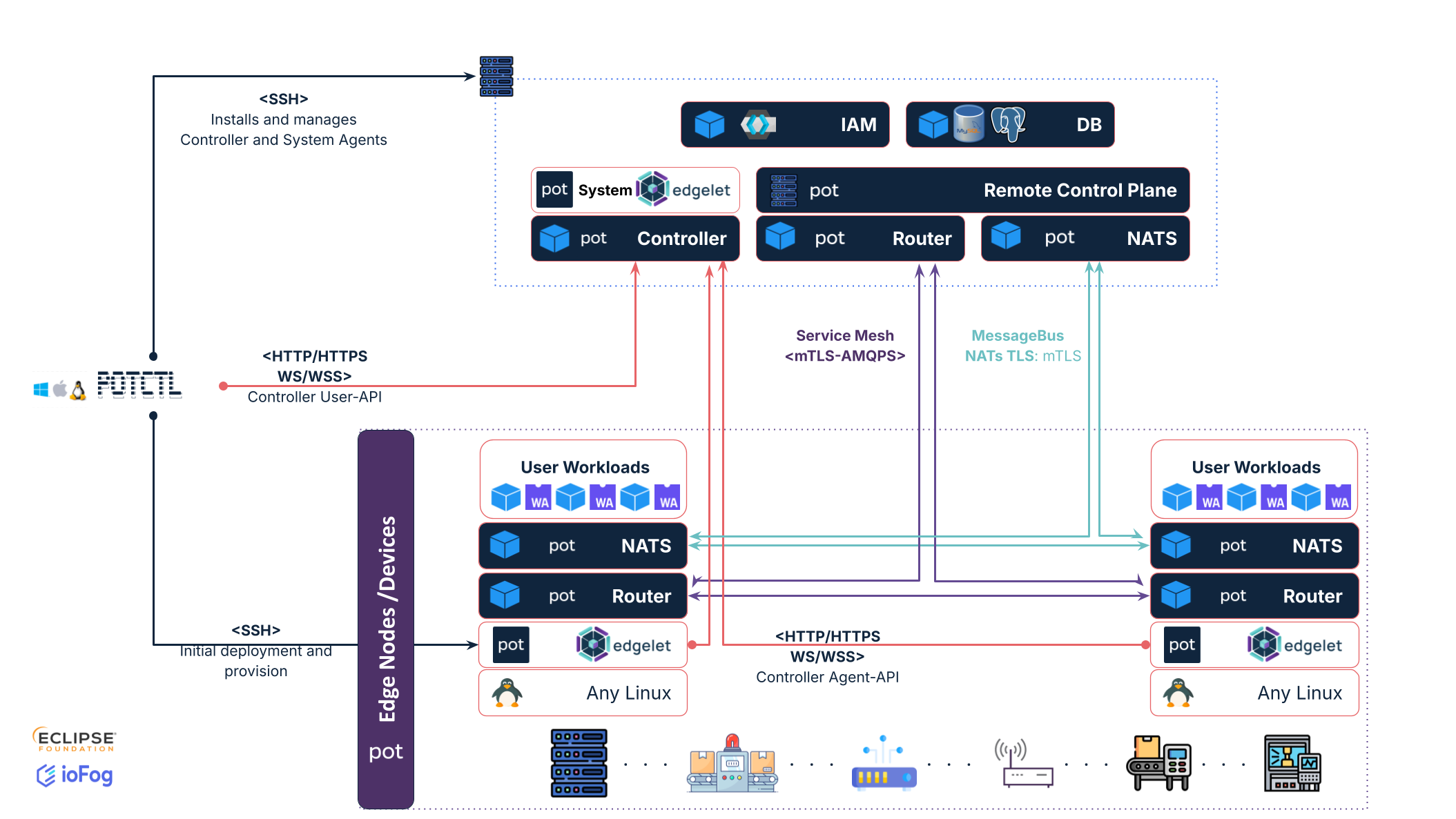
Routers communicate over AMQP. Routers also create TCP bridges for the service mesh.
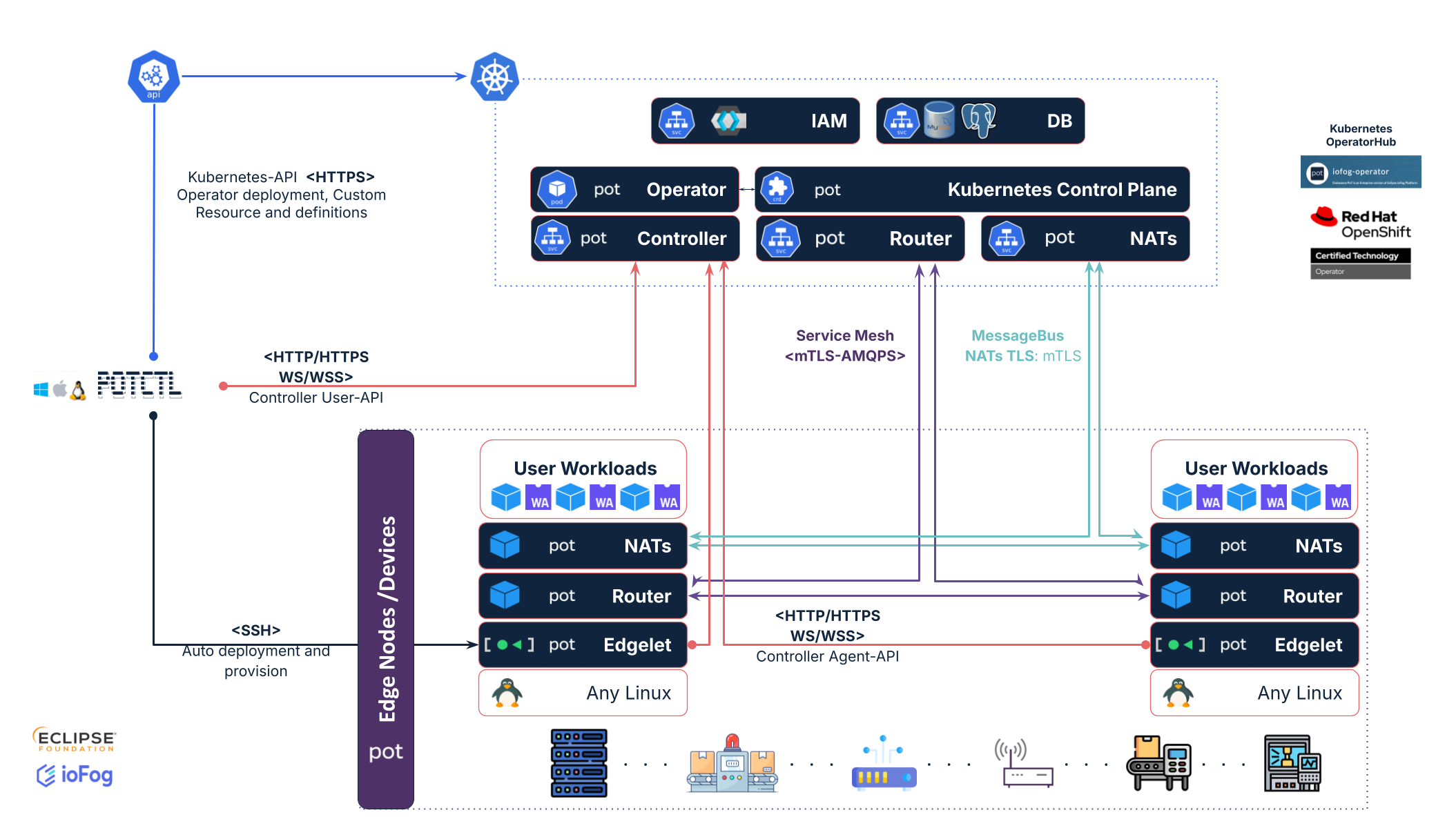
Next, we show how the Control Plane looks when part of the ECN runs on Kubernetes.
Operator
The Operator (ioFog Operator v3.9.0) manages Kubernetes Custom Resources for Datasance PoT. It reconciles Control Plane and related CRDs.
When you deploy Datasance PoT on Kubernetes with potctl or Helm, the Operator is the first component installed in the namespace. When you create a Control Plane custom resource, the Operator deploys the ECN components in that namespace.
See the Operator platform component page.
Source code: iofog-operator.
Kubernetes Control Plane
The diagram below shows an ECN with the Control Plane on Kubernetes. Edgelet nodes still run outside the cluster on edge hardware.
Datasance PoT does not schedule microservices on Kubernetes cluster nodes. Cluster nodes do not act as Edgelet nodes.
potctl
potctl is a multi-platform CLI for ECNs and Edgelet node deployments.
potctl talks to the Controller over REST and WebSocket APIs. It provisions Edgelet nodes over SSH and manages Kubernetes clusters through kubeconfig, similar to how kubectl connects to a cluster.
Start with the potctl introduction.
After nodes are deployed, see Edgelet node management.
For YAML kinds and command reference, see Cluster resources index.
Source code: potctl.
- Deploy locally: Quick start with local deployment.
- Production remote or Kubernetes deployment: Platform deployment.
- Upgrade from v3.8: Upgrading to v3.9.0.
- Developer walkthrough: Acme Smart Plant tutorial.