Architecture
The PoT architecture consists of several basic building blocks. We are going to introduce all of these one by one and show what capabilities they bring into the system, and how they are commonly deployed. Instances of these PoT components form a logical component called Edge Compute Network (ECN).
Core Architectural Principles
PoT provides a single point of control to securely deploy, operate and govern software container workloads across large and diverse edge environments. It brings cloud-native operating principles to the edge by abstracting the complexities of deploying and managing the entire lifecycle of edge workloads while building secure service mesh and distributed messageBus within edge clusters. Therefore, enterprises only focus on innovation rather than infrastructure, security and networking.
PoT is designed around three clear principles:
- Distributed, to preserve local autonomy and resilience
- Disaggregated, to remain independent of hardware, operating systems and environments
- Control-centric, with unified operations and security as first-class concerns
Together, these principles allow PoT to manage isolated edge environments as part of a coherent system without forcing central dependency.
Agnostic Control Plane and Lightweight Agents
The PoT Control Plane coordinates distributed edge environments from a central point. It is backend-agnostic and can operate across Kubernetes clusters, bare-metal systems and virtualized infrastructure. Lightweight PoT Agents run locally on edge nodes. They maintain secure communication, enable controlled service interaction between workloads and support autonomous operation when networks are constrained or unavailable.
Secure, Scalable, Hardware-Agnostic by Design
Security and control are built into PoT from the start. The platform scales smoothly from a small number of sites to large, geographically distributed clusters. Its hardware-agnostic design allows enterprises to select and evolve edge hardware freely, while maintaining consistent operational control, secure connectivity and lifecycle governance across the entire environment.
Controller
The PoT Controller is the heart of each Edge Compute Network. The Controller orchestrates all Agents, Microservices, Router and NATs instances, RBAC, Secret and Certificates and much more.
Controller can run on any bare-metal or virtual hardware and Kubernetes that is network accessible by all of your edge nodes running an Agent. Usually that means either having a static IP address or DNS records.
It is also possible to have a Controller hidden behind HTTP Ingress service, since the Controller is fully functional using its REST and Websocket APIs only.
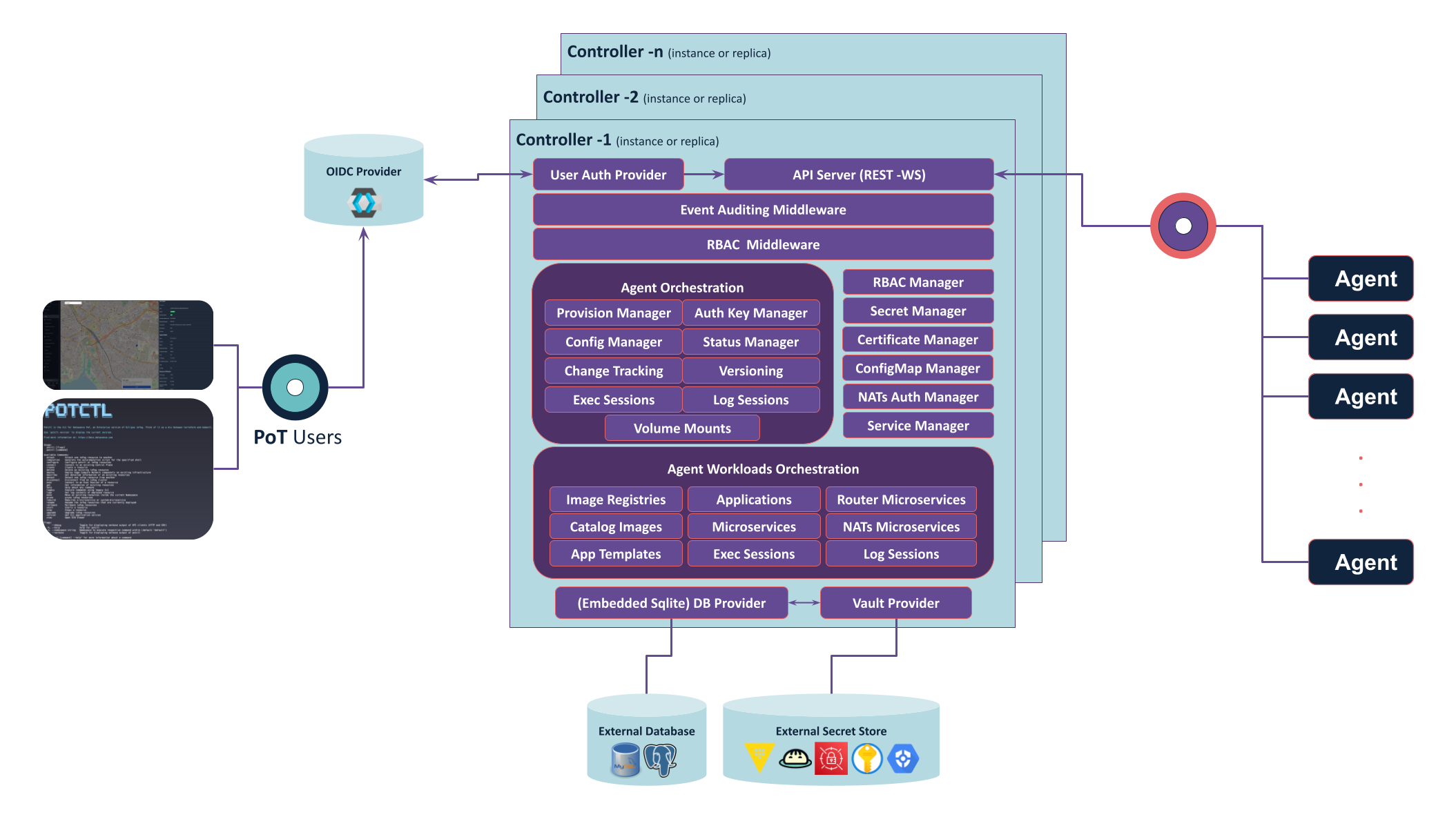
If you want to learn advanced features, how to configure the Controller or how to directly use it, go to Controller reference documentation.
To deploy and use the Controller via potctl, go to platform deployment documentation.
Feel free to also explore and potentially contribute at the Datasance/Controller github repository.
Agent
The PoT Agent is the worker ant of an Edge Compute Network. Each Agents allows for running microservices, mounting volumes, managing resources, etc. An PoT Agent reports directly the a Controller, hence why the Controller has to be accessible from the outside, but not the other way.
Each Agent manages microservice as containers and is responsible for managing their lifespan and managing images of these containers.
Agents would be typically deployed on the edge as native daemons or containerized. Multiple architectures and platforms are supported to PoT Agents.
While the Agent daemon itself has a CLI, after setting things up a majority of your management tasks will instead be done indirectly using the Controller, which controls the Agent on your behalf, remotely. This allows you to deploy and maintain microservices without needing to SSH directly onto every edge node device. In fact, you will never need to SSH into your agents yourself.
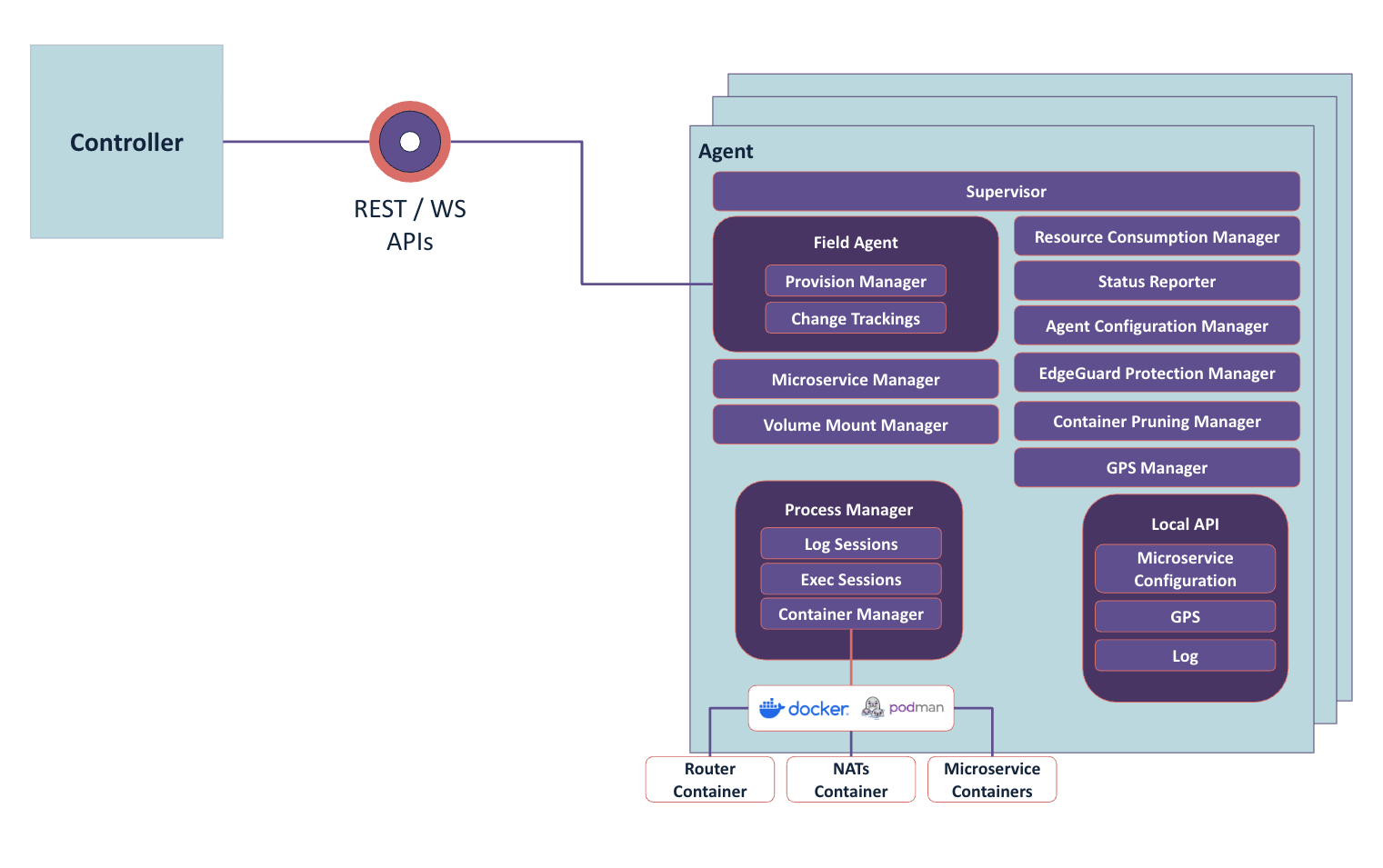
If you want to learn advanced features, how to configure the Agent or how to directly use it, go to Agent reference documentation.
To deploy and use the Agent via potctl, go to Agent management documentation.
Feel free to also explore and potentially contribute at the Datasance/Agent github repository.
Microservices
The last absolutely essential components in edge computing are microservices. They are essentially small applications running as Linux or Wasm containers on PoT Agents. Many of these microservices can run on a single Agent. This is very similar to how you would run microservices in Kubernetes, except in PoT you have a very granular control of microservice deployment to selected Agents.
If you want to know more about managing microservices in PoT, head to Microservice management.
You can also head to our tutorial for developers to Learn how to use PoT and build microservices
Router
The PoT Router is an essential component that enables microservices to communicate with each other via TCP bridges created via Service YAML kinds. Router is deployed with TLS by default. Controller keeps track of Router microservices configuration and volume mounts for their TLS certificates.
Each Controller and each Agent would have their own Router instance by default. Controller would have what is called an Interior Dispatch Router and each Agent would have their own instance of Edge Dispatch Router. These Edge Routers are by default connected to the Interior Router.
It is possible to configure the topology, such as sharing Edge Routers between Agents, or hosting Interior routers on Agents instead of Controller.
---
apiVersion: datasance.com/v3
kind: Agent
metadata:
  name: foo
spec:
  ...
  config:
    ...
    upstreamRouter:
      - default-router
    routerConfig:
      routerMode: edge
      messagingPort: 5671
---
apiVersion: datasance.com/v3
kind: Agent
metadata:
  name: edge-2
spec:
  ...
  config:
    ...
    upstreamRouter:
      - default-router
    routerConfig:
      routerMode: interior
      messagingPort: 5671
      edgeRouterPort: 45671
      interRouterPort: 55671
---
apiVersion: datasance.com/v3
kind: Agent
metadata:
  name: foo
spec:
  ...
  config:
    ...
    upstreamRouter:
      - default-router
      - edge-2 # you can assign another agent that have interior mode Router as an upstream Router
    routerConfig:
      routerMode: edge
      messagingPort: 5671
If you want to learn advanced features, how to configure the Router or how to setup custom topologies, go to Router reference documentation.
Feel free to also explore and potentially contribute at the Datasance/Router github repository.
NATs
NATs is the default messaging infrastructure (pub/sub, request/reply, K/V store and JetStream) for PoT that can be enabled when deploying Controller. When enabled, all NATs instances is deployed with TLS by default. Controller keeps track of NATs microservices configuration and volume mounts for their TLS certificates, NATs Account JWTs and creds. Applications and microservices can get NATs access via NATs Account Rules (at application level) and NATs User Rules (at microservice level); the Controller provisions credentials so you do not need to manage JWTs and cred files manually.
Each Controller and each Agent would have their own NATs instance by default. Controller would have NATs instance with servermode and Controller automatically creates NATs cluster with the all of the server mode NATs instances. Each Agent would have their own NATs isntances with leaf mode by default. These leaf NATs instance are by default connected to the upstream server mode NATs instances.
It is possible to configure NATs instance on Agents with server mode and make them part of NATs Cluster.
---
apiVersion: datasance.com/v3
kind: Agent
metadata:
  name: foo
spec:
  ...
  config:
    ...
    upstreamNatsServer:
      - default-nats-hub
    natsConfig:
      natsMode: leaf
      natsServerPort: 4222
      natsLeafPort: 7422
      natsMqttPort: 8883
      natsHttpPort: 8222
      jsStorageSize: 10g
      jsMemoryStoreSize: 1g
---
apiVersion: datasance.com/v3
kind: Agent
metadata:
  name: edge-2
spec:
  ...
  config:
    ...
    natsConfig:
      natsMode: server
      natsServerPort: 4222
      natsLeafPort: 7422
      natsClusterPort: 6222
      natsMqttPort: 8883
      natsHttpPort: 8222
      jsStorageSize: 10g
      jsMemoryStoreSize: 1g
---
apiVersion: datasance.com/v3
kind: Agent
metadata:
  name: foo
spec:
  ...
  config:
    ...
    upstreamNatsServer:
      - default-nats-hub
      - edge-2
    natsConfig:
      natsMode: leaf
      natsServerPort: 4222
      natsLeafPort: 7422
      natsMqttPort: 8883
      natsHttpPort: 8222
      jsStorageSize: 10g
      jsMemoryStoreSize: 1g
To enable and configure NATs on a control plane, see the Control Plane YAML Specification (NATs enabled, replicas, images, services).
For access control, see NATs Account Rule and NATs User Rule.
Edge Compute Network - Remote Control Plane
Having introduced the Router, we can now extend our ECN from the previous example with microservice communication and microservice public port exposure for service mesh.
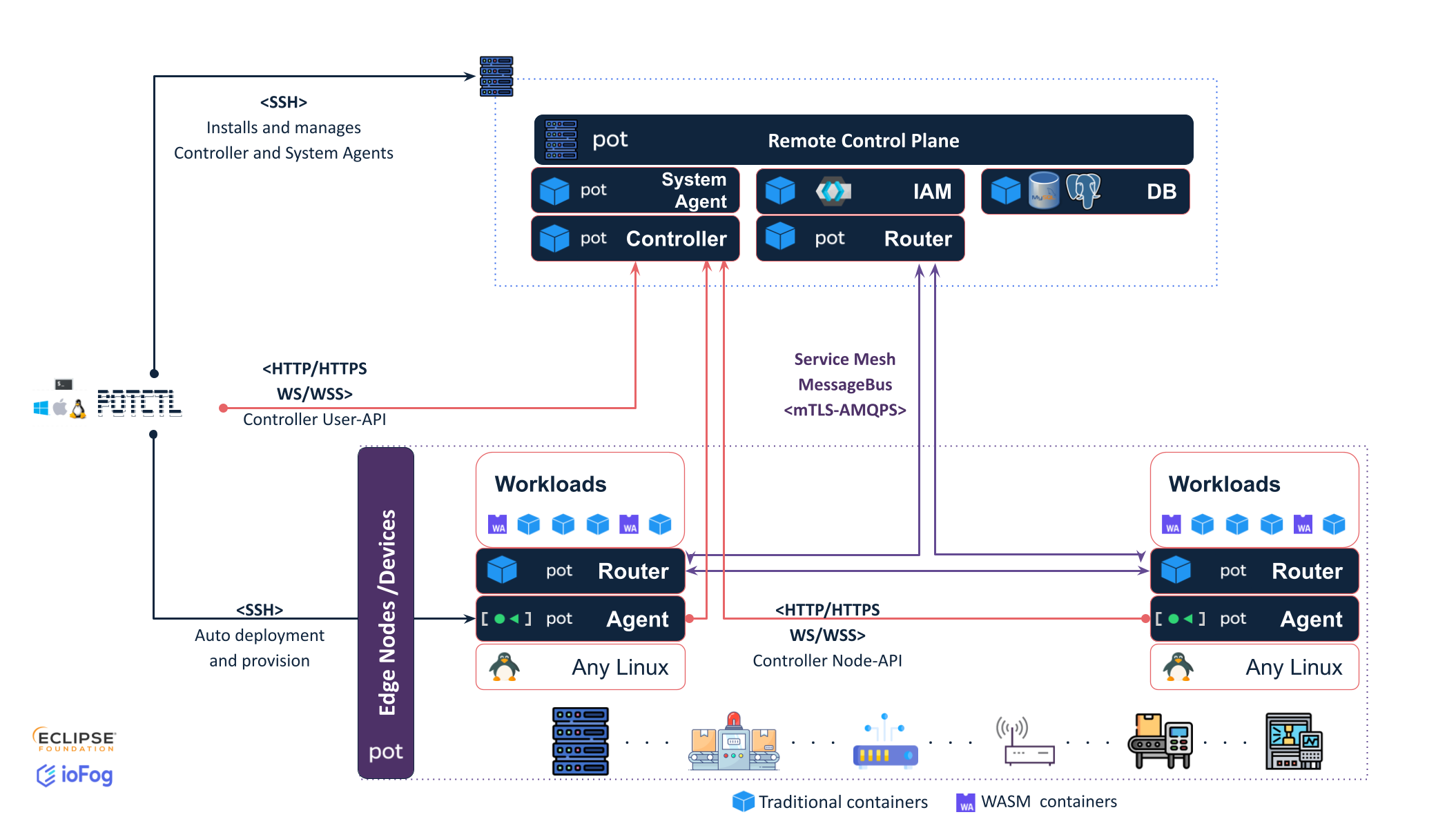
In this example, we have two Agents, each running one microservice. Each Agent, by default, has its own Edge Router, which is connected to the Interior Router co-hosted with the Controller.
All communication between routers is using AMQP protocol, and also Routers create TCP bridges for service mesh.
Next, we are going to transition to the Kubernetes world and show how ECNs look when part of them are deployed on Kubernetes.
Operator
This is the PoT Operator for Kubernetes, which takes care of managing Kubernetes Custom Resources. In PoT, we support Custom Resource Definitions for a control plane and for applications.
When deploying PoT on Kubernetes using potctl or Helm, the PoT Operator would be the first things deployed in the namespace. When a new control plane Custom Resource is then created, PoT Operator picks up on that and deploys an ECN in the same Kubernetes namespace.
As an internal part of the PoT stack, the Operator is not a separately manageable component. However, feel free to explore and potentially contribute at the Datasance/PoT-operator github repository.
Edge Compute Network - Kubernetes ControlPlane
The last example we are going to show is PoT ECN deployed on Kubernetes. In fact, only the control plane is deployed on Kubernetes, while Agents are still hosted outside of the cluster - on the edge.
Note that there is currently no way in PoT to schedule microservices on the Kubernetes cluster itself, i.e. the cluster nodes acting as PoT agents.
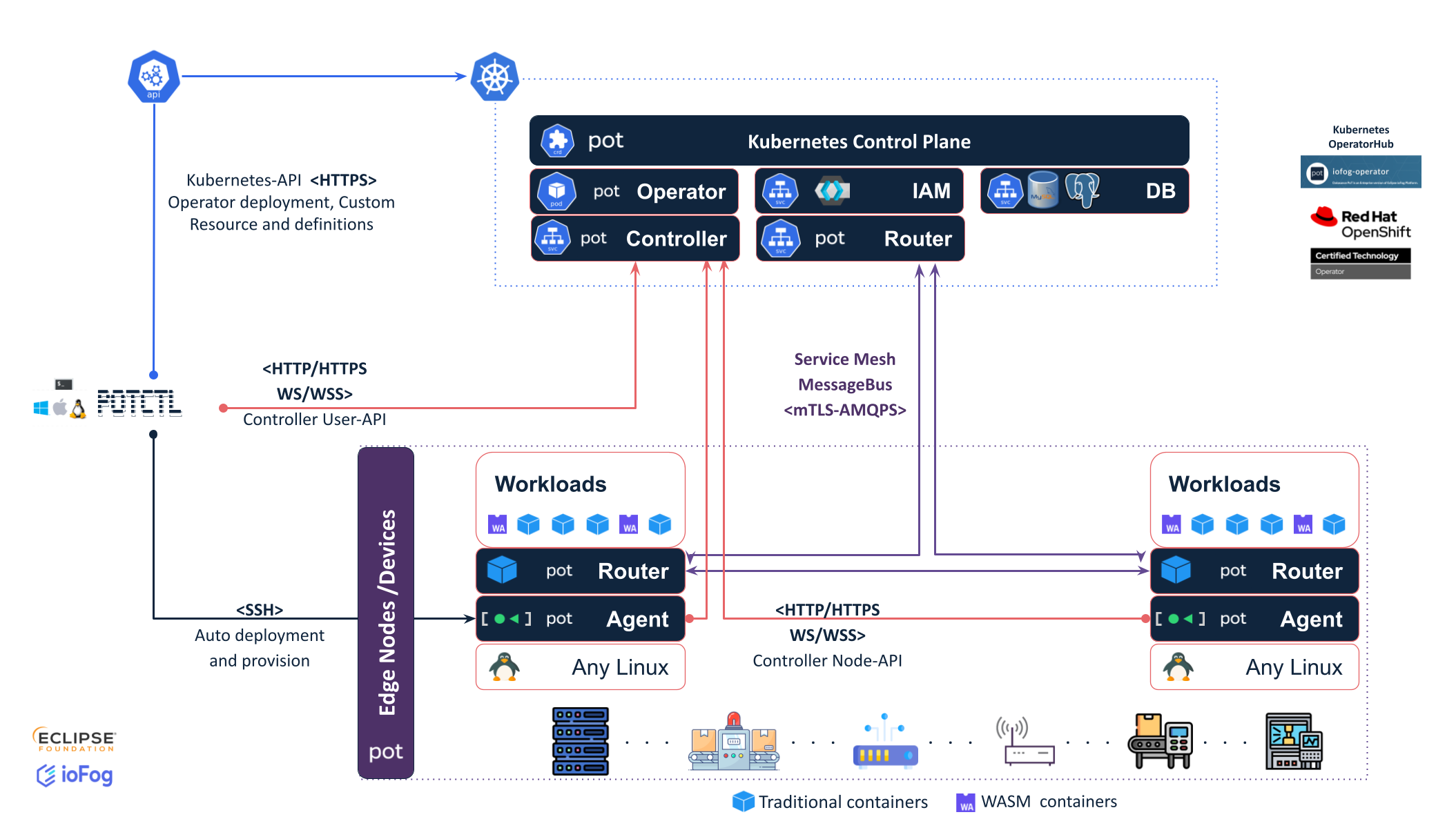
And that should be it for the basic PoT architecture.
potctl
potctl is a multi platform CLI tool designed to manage ECNs and Agent deployments.
potctl works by interacting directly with Controller using REST and Websocket APIs, with Agents over SSH, or with Kubernetes clusters using kubeconfig access configuration, similarly to how kubectl handles connections to Kubernetes clusters.
You will be working with potctl for majority of the documentation. To go through the basic introduction to the tool, see basic potctl documentation.
If you want to check detailed reference of all potctl features, go to potctl reference documentation.
Feel free to also explore and potentially contribute at the Datasance/potctl github repository.
If you want to get started right away, you can check out the Quick Start Locally guide to deploy PoT locally on your computer, or go through production deployment in Platform deployment for both remote and Kubernetes deployments.
You can also head to our tutorial for developers to Learn how to use PoT and build microservices